
Why Caption Styling Makes or Breaks a Thesis
In college and institute paper formatting, captions are the bridge between your data and your reader. A graph without a clear, legible label is useless.
Academic standards like APA, IEEE, and MLA have specific rules for these:
- Figures: Captions usually go below the image.
- Tables: Captions often go above the table.
- Typography: Captions are frequently required to be smaller (e.g., 10pt or 11pt) than the main body text, or styled in Italics to stand out.
PaperFormat.net gives you a dedicated control panel to separate these styles globally. You can make all your Table titles Bold and all your Figure descriptions Italic without editing them one by one.
Step-by-Step: Customizing Caption Styles
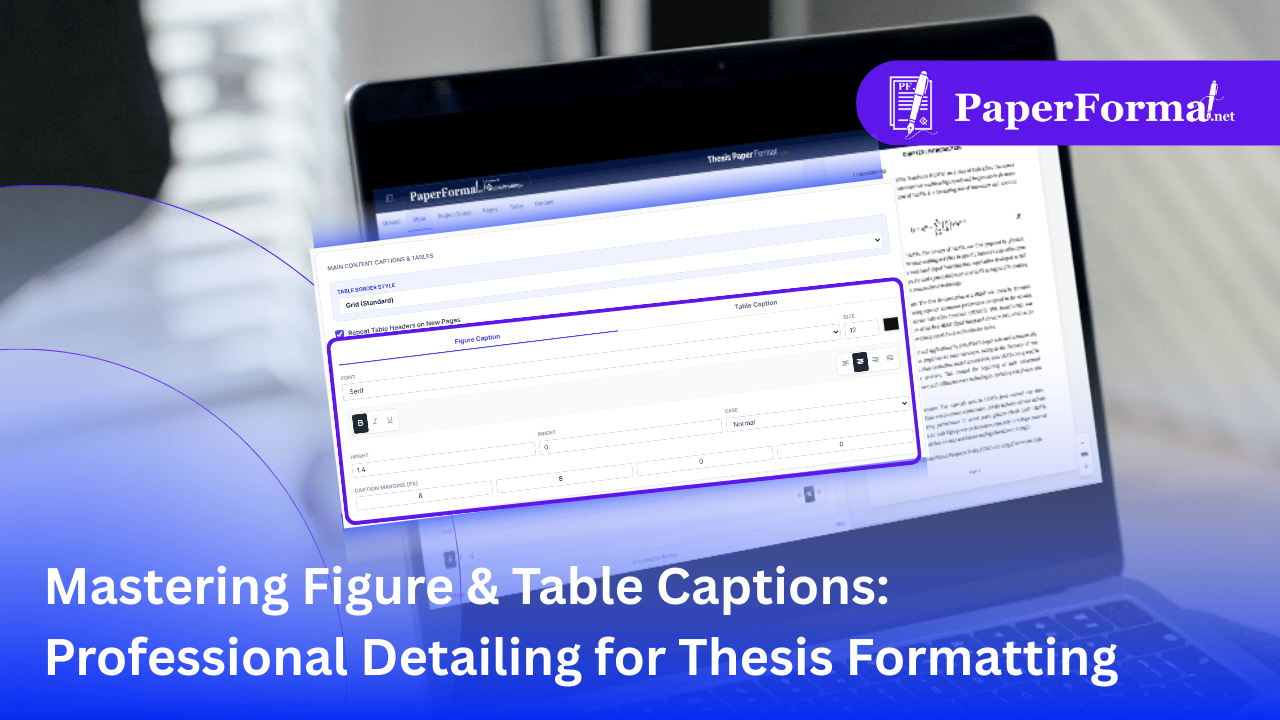
Refer to the screenshot above and follow these steps to ensure your visual data meets academic standards.
Step 1: Access the Caption Settings
- Navigate to the "Style" tab in the top navigation bar.
- Scroll down to the section titled "MAIN CONTENT CAPTIONS & TABLES".
Step 2: Choose Your Target (Figure vs. Table)
- As shown in the image, there are two distinct tabs: "Figure Caption" and "Table Caption".
- Why is this important? Many institutes require Table titles to be bold but Figure titles to be normal weight. By clicking these tabs, you can set different rules for each type.
Step 3: Define Typography
- Font & Size: Select the font family (e.g., Serif) and size. The image shows a size of 12, but many universities prefer 10 or 11 for captions to distinguish them from body text.
- Emphasis: Use the formatting icons. You can toggle Bold (B), Italic (I), or Underline (U).
- Alignment: The alignment icons (Left, Center, Right) let you center your captions, which is standard for Figure Labels in thesis formatting.
Step 4: Control Spacing (Margins)
- Captions shouldn't hug the image too tightly. Use the "CAPTION MARGINS (PX)" fields.
- Top/Bottom: The image shows 8 px for both Top and Bottom. This creates necessary "breathing room" between the image/table and its label, ensuring the text is readable.
Why Global Caption Styling is Essential
- Institute Compliance: If your thesis reviewer says, "All figure captions must be italicized," you can fix 50+ images instantly by toggling the "I" button in this panel.
- Visual Hierarchy: By making captions slightly smaller or lighter than paragraph text, you help the reader distinguish between your analysis and your data labels.
- Professional Polish: Consistent spacing (margins) prevents the sloppy look where some captions touch the image while others float away.