
The "Lost Reader" Problem in Institute Papers
In college and institute paper formatting, data tables often span across multiple pages. A common mistake students make is leaving the second page of the table "headless." This forces the examiner to flip back and forth to remember what "Column 3" represents.
Most universities (and strict formats like APA or IEEE) mandate that the header row must appear at the top of every new page the table occupies.
PaperFormat.net automates this with a single global setting. You don't need to manually split tables or copy-paste rows. Just toggle one switch, and every table in your thesis becomes smart and responsive.
Step-by-Step: Enabling Repeated Headers
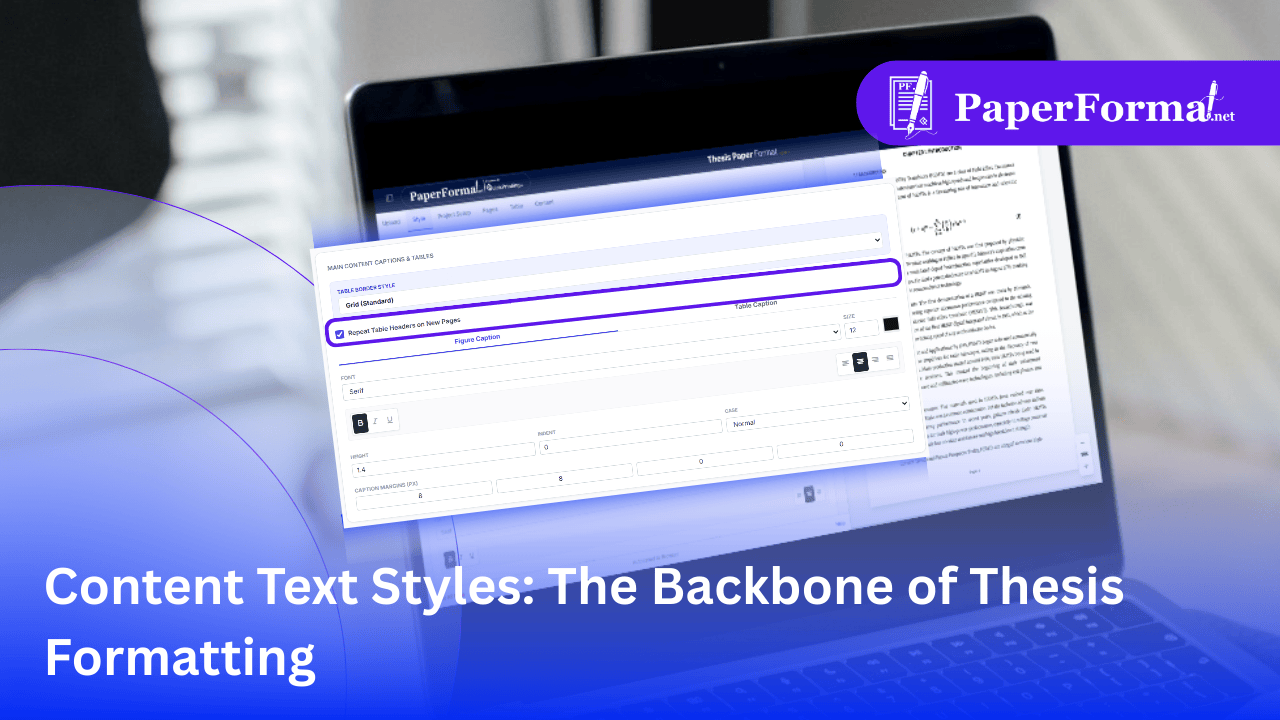
Refer to the screenshot above and follow these steps to fix your long tables instantly.
Step 1: Access the Global Style Settings
- Navigate to the "Style" tab in the top navigation bar.
- This tab controls the global behavior of your project paper, ensuring consistency across all chapters.
Step 2: Locate Table Settings
- Scroll down to the section titled "MAIN CONTENT CAPTIONS & TABLES".
- This section manages how your figures and tables appear throughout the document.
Step 3: The Magic Checkbox
- Look for the checkbox labeled "Repeat Table Headers on New Pages".
- Check this box.
- What happens next? Our rendering engine now watches every table in your document. If a table flows from Page 10 to Page 11, the engine automatically duplicates the first row (the header) and places it at the very top of the table segment on Page 11.
Step 4: Verify Table Styles (Optional)
- While you are here, you can also set the "TABLE BORDER STYLE". The image shows "Grid (Standard)" selected, which is the safest choice for most college paper formatting guidelines.
Why This Feature is a Lifesaver
- Zero Maintenance: If you add text to Chapter 1 and your table shifts down, the page break moves. Our system dynamically recalculates where the header needs to repeat. You never have to fix it manually.
- Professionalism: Nothing screams "amateur" like a page full of numbers with no labels. Repeated headers make your project report look professionally typeset.
- Institute Compliance: External examiners look for this specific detail when grading thesis formatting.