
Why Backing Up is Critical for Institute Papers
In college and institute paper formatting, your document is more than just text—it's a complex web of settings, margins, equations, and automated indices. If you only save a PDF, you lose the ability to edit these settings later.
PaperFormat.net allows you to export a Project Backup File (.json). This file acts like a "save state" for your entire workspace. It preserves your custom styles, your automated Table of Contents, and your image layouts so you can reload them exactly as they are on any computer.
Step-by-Step: Exporting Your Backup
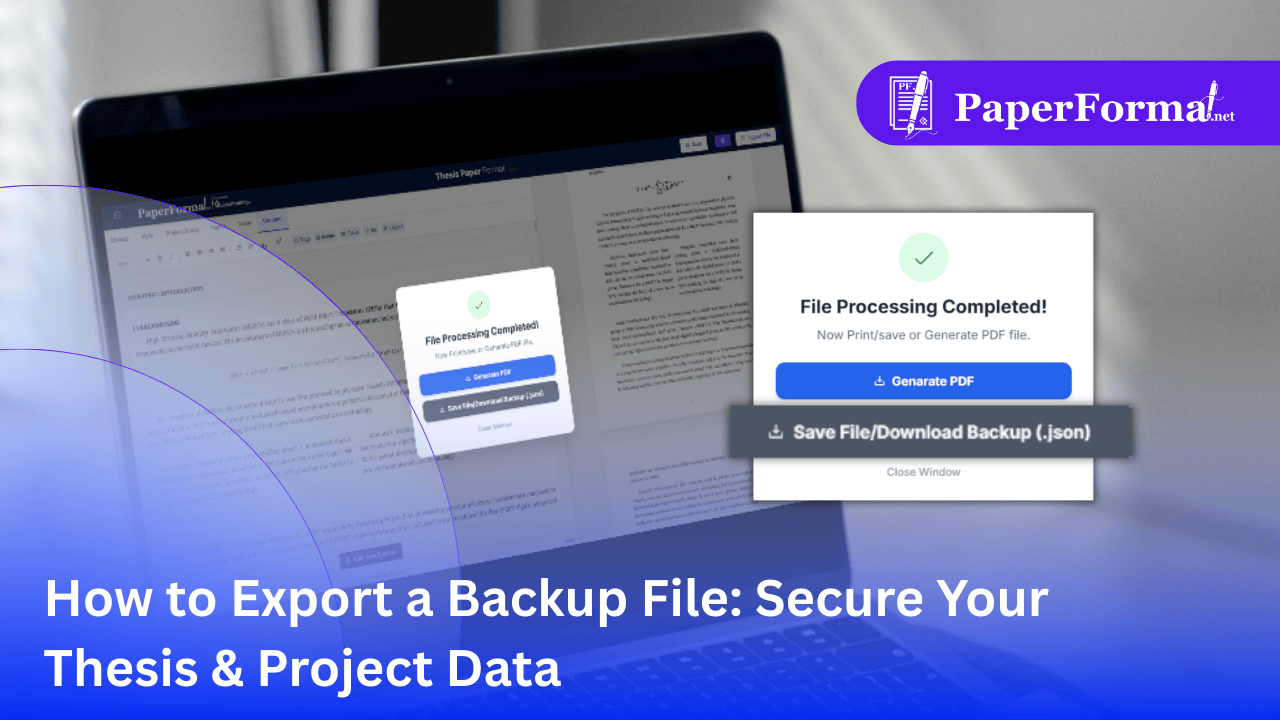
Refer to the screenshot above and follow these steps to save your work safely.
Step 1: Finish Your Session
- Before closing your browser, always ensure your latest changes are ready.
- Look at the top right corner of the navigation bar.
- Click the "Export File" button (circled in the image).
Step 2: Wait for Processing
- The system will briefly scan your document to compile all data, images, and formatting rules.
- A popup modal will appear with the message: "File Processing Completed!".
Step 3: Choose the Correct Format
The popup offers two distinct options. For backing up, you must choose the second one:
- Option A: Generate PDF (For Printing)
- This creates the final, non-editable document for submission. Do not rely on this for backups.
- Option B: Save File/Download Backup (.json) (For Safety)
- Click this button (highlighted in the image).
- This downloads a raw data file (e.g.,
project_backup.json) to your computer.
The Difference Between PDF and .JSON
- PDF: It is like a printed photo. You can look at it, but you can't move the furniture around. If you find a typo in Chapter 3, a PDF is hard to fix.
- .JSON Backup: It is like the blueprint. When you import this file back into the portal, everything becomes live and editable again. You can change the font, resize images, and add new chapters instantly.
Best Practices for Thesis Data Safety
- Version Control: Save backups with dates (e.g.,
Thesis_Backup_Nov01.json,Thesis_Backup_Nov05.json). If you make a mistake, you can revert to last week's version. - Cloud Storage: Email the .json file to yourself or save it to Google Drive. This protects you if your laptop crashes before your college paper submission deadline.