
The "Front Matter" Determines Your Paper's Fate
In IEEE paper formatting, the "Front Matter" (Title, Abstract, and Index Terms) is the most scrutinized part of your document.
- The Title: Must be centered, 24pt, and non-bold (usually).
- The Abstract: Must be a single bold paragraph, fully justified, and often limited to 150-250 words.
- Index Terms: Must be an alphabetical list of keywords separated by commas.
PaperFormat.net automates the styling. You simply input the raw text, and our system renders it into the standard two-column IEEE layout automatically.
Step-by-Step: Editing Your Paper's Front Matter
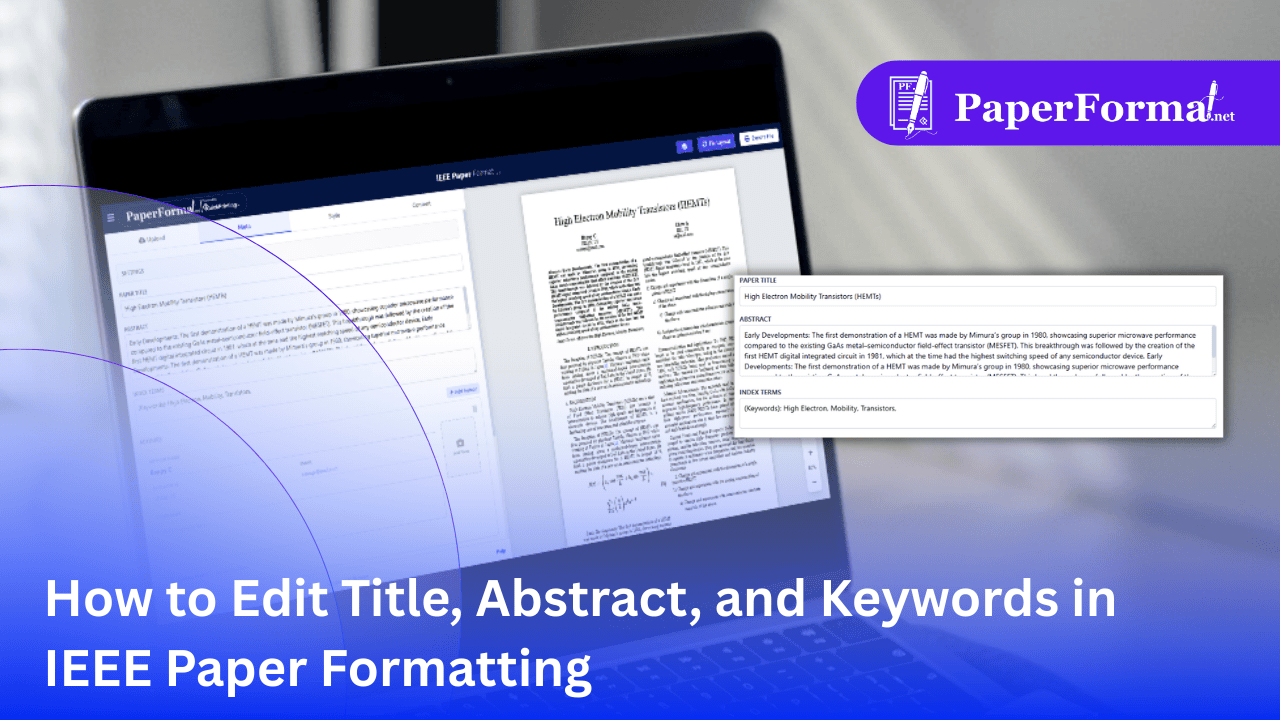
Refer to the screenshot above and follow these steps to update your document's core identity.
Step 1: Access the Meta Tab
- Navigate to the "Meta" tab in the top navigation bar (circled in purple in the image).
- This tab acts as the control center for all "top-level" information about your research.
Step 2: Enter the Paper Title
- Locate the field labeled "PAPER TITLE".
- Action: Type your full title here.
- Automation: Do not worry about centering or font size. As shown in the preview on the right, the system automatically formats it as a large, centered block spanning both columns.
Step 3: Write the Abstract
- Locate the "ABSTRACT" text area.
- Action: Paste your abstract here.
- Style Note: The system will automatically add the bold label "Abstract—" at the beginning of the text in the final PDF, adhering to IEEE styling rules. You just need to provide the raw text.
Step 4: Define Index Terms (Keywords)
- Locate the "INDEX TERMS" field.
- Action: Type your keywords separated by commas (e.g., "High Electron, Mobility, Transistors").
- Format Check: The system automatically italicizes the label Index Terms— and formats your keywords to match the required font weight.
Why You Should Use the Meta Tab (Instead of the Editor)
- Layout Safety: In Word, users often accidentally delete the section break between the Abstract (1-column) and the Introduction (2-columns), ruining the layout. The Meta Tab keeps these separate, ensuring the layout never breaks.
- Database Indexing: When you eventually submit to IEEE Xplore, accurate metadata is crucial for search engines. By keeping this data structured in the Meta tab, we ensure it exports correctly.