
The Unique "Springer Look": Why These Settings Matter
In Springer paper formatting (especially for LNCS and CCIS proceedings), the layout is distinct from standard IEEE or ACM papers.
- The "50mm" Rule: The first page (and only the first page) requires a massive 50mm top margin. This empty space is reserved for the editors to print the Conference Volume Number and Copyright information.
- The "Narrow" Header: The Title, Author list, and Abstract are often narrower than the main body text, creating a centered "block" effect.
PaperFormat.net provides specific controls for these quirks so you don't have to fight with manual spacing in Word.
Step-by-Step: Setting Up the Springer Layout
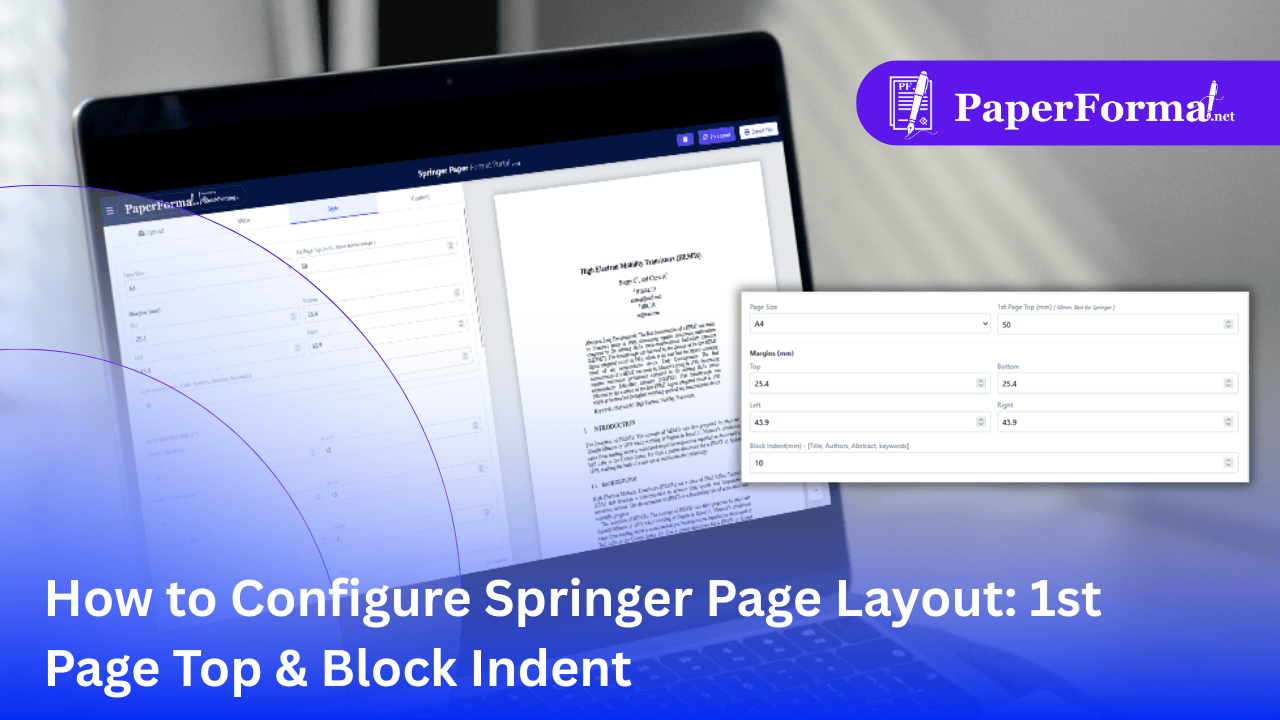
Refer to the screenshot above and follow these steps to achieve the perfect LNCS look.
Step 1: Access the Style Tab
- Navigate to the "Style" tab in the top navigation bar.
- This panel controls the global geometry of your document.
Step 2: Set Page Size & Global Margins
- Page Size: Set this to "A4". This is the standard for almost all Springer proceedings.
- Margins (mm): Set your standard document margins here (e.g., Top: 25.4, Bottom: 25.4, Left/Right: 43.9). These apply to every page except the first.
Step 3: The "1st Page Top" Setting (Crucial)
- Look for the field labeled "1st Page Top (mm)" at the top right of the settings block.
- The Golden Number: Set this to 50.
- Visual Check: Notice the green arrow in the image pointing to the large white space above the title. This ensures your paper is not rejected for crowding the copyright header.
Step 4: The "Block Indent" Setting
- Look for the field labeled "Block Indent(mm) - [Title, Authors, Abstract, keywords]".
- Recommended Value: Set this to 10 (or whatever your specific conference guide requests).
- What it does: As shown by the purple arrows in the image, this pushes the Title and Abstract inward from both the left and right sides.
- Result: Your Title/Abstract block effectively becomes narrower (e.g., 100mm wide) while your main introduction text remains full width (e.g., 122mm wide), creating that classic, professional Springer appearance.
Why Automation Beats Manual Formatting
- Consistency: If you try to do this in Word using "text boxes" or "indentation," it often breaks when you export to PDF. Our system applies these rules globally at the rendering level.
- Safety: By hard-coding the 50mm top margin, you guarantee that no content will ever accidentally overlap with the editor's stamp.